Key Takeaways
- A good ATS CV template helps, but most templates are sold on appearance and use the exact features that break parsing.
- Greenhouse names columned layouts, tables, text boxes and graphics as causes of failed CV parsing.
- Single column, real text, standard headings. The template's job is to stay out of the parser's way.
An ATS CV template can genuinely help you. It settles the section order, keeps the headings standard, and stops you inventing a layout at 11pm the night before a deadline. That is worth something.
The problem is what the word "template" has come to mean. Most CV templates are designed to be chosen - from a gallery, on appearance, in about four seconds. The features that win that four-second choice are sidebars, skill rating bars, icons, colour blocks and two-column grids. Those same features are the ones applicant tracking systems struggle to read. ATS software is standard at large employers - Jobscan detected one at 97.4% of Fortune 500 companies in 2026 - so a template that wins the gallery and loses the parser is a bad trade.
Do CV templates help with ATS, or hurt?
Both, depending entirely on which template. The category is not the problem - the selection criteria are.
You can settle the question without trusting a single CV-advice blog, because one of the major ATS vendors publishes the answer. Greenhouse maintains a support article on why a CV fails to parse. The causes it names include:
- A columned layout
- Tables, headers and footers
- A name and contact details sitting in the header, footer or a text box
- Graphics, photos or word art
- A CV uploaded as an image rather than a document
- A CV with no clear sections, formatted differently from one section to the next
Read that as a shopping list and you have described the average premium CV template. The sidebar holding your contact details, the table organising your skills, the header containing your name - each one appears on the vendor's own list of things that break the parse.
This is not a claim about what recruiters like. It is documentation from the company whose software reads the file.
What an ATS CV template has to get right
The requirements are unglamorous, which is exactly why templates that compete on looks fail them.
- One column, top to bottom. Parsers read a document as a linear stream of text. A two-column layout asks the software to understand a grid, and it frequently reads straight across instead, merging your job title with an unrelated skill.
- Contact details in the body. Not in the header, not in the footer, not in a floating text box. Greenhouse lists all three as parse failures. A CV the system cannot attribute to you is worse than a weak one.
- Real text, not pictures of text. Skill rating bars, icon sets and graphic dividers carry no text layer. Whatever they represent is invisible. Five dots next to "French" tell the parser nothing about your level, which is why languages on a CV belong in text, with a CEFR level.
- Standard section headings. "Work Experience", "Education", "Skills". A parser locates sections by matching known headings. "My Journey" is a section the software cannot find.
- A conventional font at a readable size. National Careers Service guidance is a clear font such as Arial, Times New Roman or Calibri at size 11 or bigger, with headings and bullet points, and the same style used throughout - which CV font and size to use covers where GOV.UK's stricter 12-point accessibility rule fits.
Microsoft's own behaviour is the clearest signal here. Microsoft publishes a separate, dedicated collection of ATS-friendly templates, distinct from the general Word template gallery. A company does not maintain two collections unless the first one does not do the job.
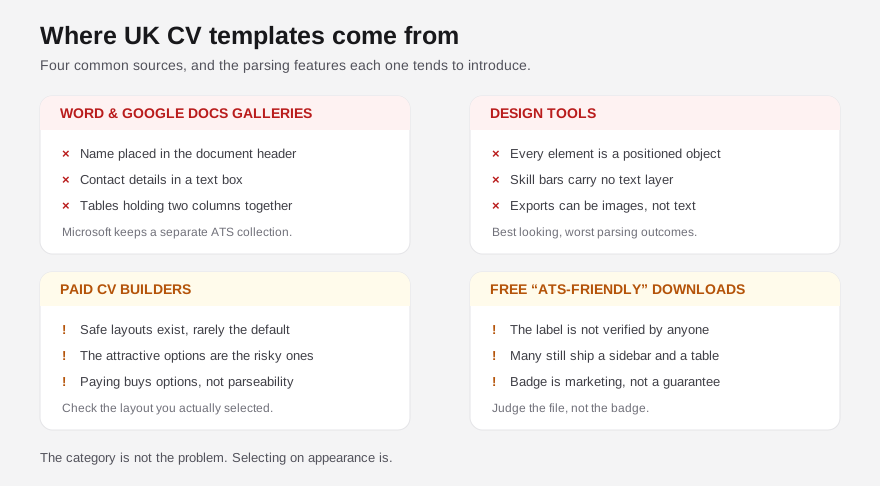
Where each kind of CV template goes wrong
Word and Google Docs galleries. The default galleries are curated for visual variety. Several of the most-used designs place your name in a header and your contact details in a text box, and use tables to hold the two-column structure together. They open perfectly and parse badly. Microsoft's separate ATS collection exists precisely because the main gallery is not built for this.
Design tools. Canva and similar tools produce the best-looking CVs available to a non-designer, and the worst parsing outcomes. Everything is a positioned object; a great deal of it is not text at all. We tested three popular Canva templates through ATS simulation and the scores landed between 25 and 38 out of 100, against 71 for identical content in a plain Word document.
Paid CV builders. Subscription builders vary more than their marketing suggests. Many offer a genuine ATS-safe layout alongside a dozen designs that are not, and the default selection is rarely the safe one. Paying does not buy parseability; it buys options, and the attractive options are the risky ones.
Free "ATS-friendly" template downloads. The label is unregulated. Plenty of downloads carrying an ATS badge contain a sidebar and a skills table. Judge the file, not the badge - the checks in this post take about a minute. If you would rather start from a set already built to the constraint, our own gallery of twelve ATS-safe CV templates is free to browse and edit in the browser.

The template trap nobody warns you about
Every template ships with placeholder content, and it is not always fully replaced. This creates a failure mode specific to templates, and it is more damaging than most people would guess.
Greenhouse's parse-failure documentation lists "fake or poorly disguised data" as a distinct cause, naming placeholder company names such as "Company 1" and "Client 1" and job titles such as "employee 1". If a template's dummy entry survives into the file you submit, it does not merely look careless to a human reader. It can stop the parse.
The same article names another quiet one: incomplete job titles. Its example is "Sr. Account Exec" instead of "Senior Account Executive". Templates encourage this directly, because a narrow sidebar column forces abbreviation to make titles fit. The design constraint produces the parsing problem.
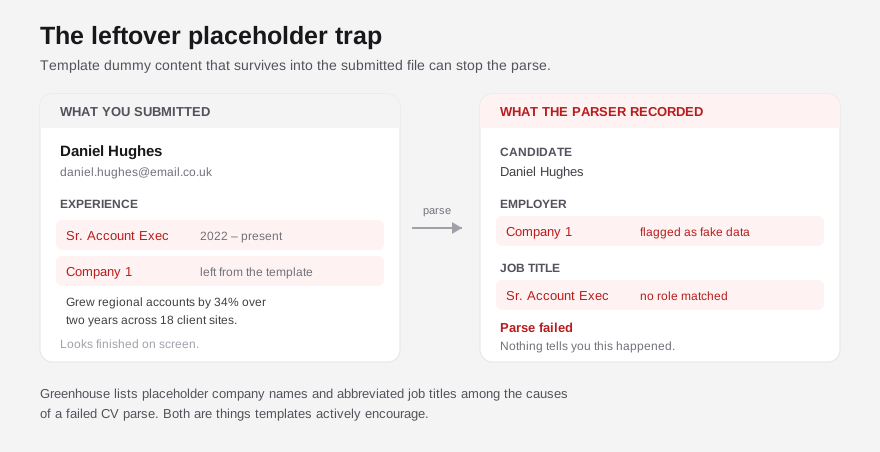
There is a related version of this involving file size. Greenhouse accepts candidate uploads up to 100MB, but states it cannot parse a CV larger than 2.5MB. An image-heavy template with embedded photos and high-resolution graphics can therefore upload successfully, show every sign of having been submitted, and never be parsed at all. Nothing tells you.
How to check whether your CV template passes ATS
Four checks, no tools required for the first three.
- The copy-paste test. Open your CV, select all, copy, and paste into a plain text editor. What you see is roughly what the parser sees. If the order is scrambled, sections are interleaved, or your contact details are missing, the template is failing you.
- Find your name. If your name and phone number vanish in that plain-text version, they are in a header, footer or text box. Move them into the body.
- Hunt the placeholders. Search the document for "Lorem", "Company", "Your Name" and any dummy dates. Templates hide these in sections people delete visually but never actually clear.
- Check the file size. A CV should be a few hundred kilobytes. Multiple megabytes means embedded images, which means graphics doing work that text should be doing.
If those pass, the template is doing its job - staying out of the way. The remaining question is content, which is a different problem entirely, and the one worth spending your time on. Our guide to what an ATS actually does with your CV covers the pipeline in detail, and what to remove from your CV covers the elements worth cutting once the layout is safe.
FAQ
Is a plain CV template less impressive to a recruiter? A single-column CV with clear headings is not a worse read for a human - it is a faster one. Recruiters skim for role, employer, dates and relevance. A sidebar makes that slower, not more impressive. The design elements that feel like differentiation are mostly working against both audiences.
Should I use a PDF or a Word file with my template? Both are accepted. Greenhouse's supported formats are .doc, .docx, .pdf, .rtf and .txt. A text-based PDF exported from Word or Google Docs parses reliably. What fails is a PDF that is really an image - exported from a design tool, or scanned - because there is no text layer to extract.
Do free ATS CV templates actually work? Some do. The label is not verified by anyone, so it carries no guarantee. Apply the copy-paste test to any template before you commit to it, whether it is free, paid, or badged as ATS-friendly.
Will an ATS reject my CV outright because of the template? Usually not as a formal rejection. The more common outcome is that a badly parsed CV ranks poorly and never surfaces in the recruiter's search, which looks identical to silence from the outside. We cover this distinction in whether you really need an ATS-friendly CV.
Can I fix my existing template rather than starting again? Often, yes. Collapsing a two-column layout into one column, moving contact details out of the header, replacing graphic skill bars with text and clearing placeholder content resolves most of it. Rebuilding from scratch is rarely necessary.
See what the parser sees, not what the gallery shows
The gap between a CV that looks right and a CV that parses right is invisible until something reads it the way the software does. Run a free scan of your CV - Shadow CV shows you exactly what an ATS extracts from your template, which sections it fails to find, and where your keywords are being lost to layout. If the scan shows the template is the problem, the £5 rewrite rebuilds it as a clean single-column CV that keeps your content and drops the features breaking the parse - once, with no monthly subscription.