Key Takeaways
- Whether your CV should be a PDF or Word file depends on who handles it next - mainstream ATS platforms parse both formats reliably.
- Send a text-based PDF for direct applications and a .docx to recruitment agencies.
- Keep the file under 1MB: that clears Reed's upload cap and sits safely inside Greenhouse's 2.5MB parse ceiling.
Every application ends at the same dialog box: save your CV as a PDF or send the Word document. The advice online splits into two camps - PDF protects your formatting, Word is safer for the software - and both camps are mostly repeating each other. The truthful answer is that mainstream applicant tracking systems parse both formats reliably, so "PDF or Word" is rarely the decision that costs you an interview. What does matter is where the file is going next. A hiring manager opening it on a phone, a recruitment agency rebuilding it onto a branded template, and a job board converting it on upload each reward a different choice.
What ATS Software Actually Accepts: PDF and Word Both Parse
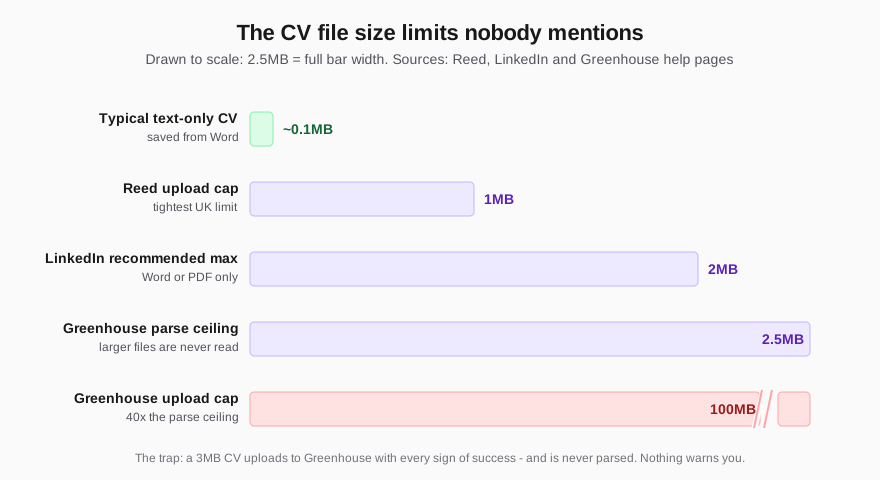
Start with what the software vendors publish, because one of them answers the question directly. Greenhouse, an ATS used widely by UK employers, lists its supported candidate upload formats as .doc, .docx, .pdf, .rtf and .txt, and accepts uploads up to 100MB. PDF and Word sit side by side on that list. Neither is penalised, and no mainstream UK platform rejects either.
The same documentation carries the two details that should actually change how you save the file. First, Greenhouse states it cannot parse a CV larger than 2.5MB - so a file padded with photographs or high-resolution graphics can upload successfully, show every sign of being submitted, and never be read at all. Second, its list of parse-failure causes never mentions picking the wrong format. It names image-based CVs, tables, columned layouts, and contact details placed in headers, footers or text boxes - layout problems that break a Word document as thoroughly as they break a PDF. The parsing pipeline reads the text inside the file; the extension on the end changes very little.
So the real question is not which format passes the filter. Both do. The question is which format serves the route your CV is about to take.
When to Send Your CV as a PDF
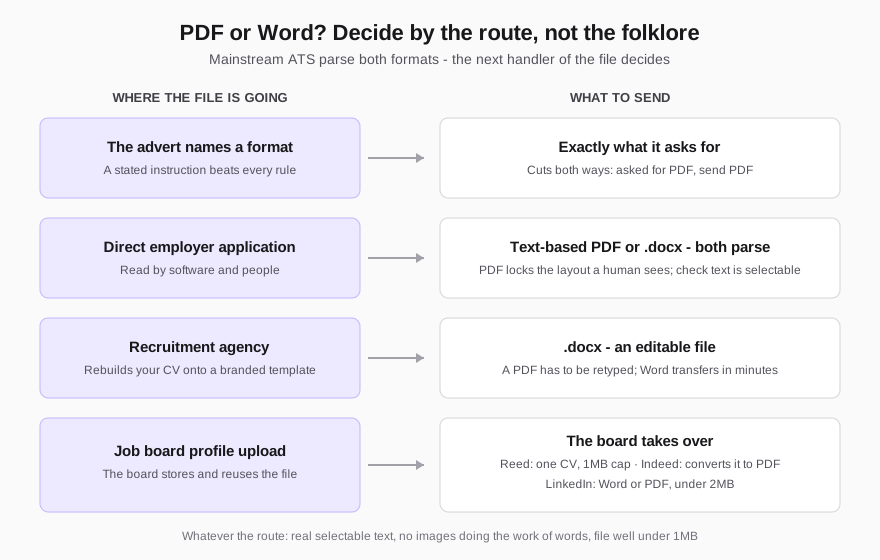
A PDF is the right choice when your CV goes straight to an employer and will be read by people as well as software. The format locks your layout: the fonts, spacing and page breaks a hiring manager sees on their phone are exactly the ones you approved on your laptop. A .docx opened in a different Word version, in LibreOffice, or in a browser preview can reflow enough to push a tidy two-pager onto a scrappy third page.
The condition is that it must be a text-based PDF - one exported from Word, Google Docs or a similar editor, where the words exist as selectable text. The trap is the PDF that is really a picture. Design tools sit at the extreme end of this: when we tested three popular Canva templates through ATS simulation, they scored between 25 and 38 out of 100, against 71 for the identical content in a plain Word document, largely because so much of the visual output is not machine-readable text. A scanned or photographed CV has the same problem in full: the parser extracts nothing.
The test takes ten seconds. Open your PDF, try to select a sentence with your cursor, and copy it out. If you cannot select the text, neither can the software.
When to Send Your CV as a Word Document
Three situations point to a .docx instead.
The advert or portal names it. Some application systems and government departments specify Word submissions, and a stated instruction beats every general rule in this article. This cuts both ways: if the advert asks for PDF, send PDF.
A recruitment agency is involved. Agencies routinely rebuild candidate CVs onto their own branded template before the client sees them, and why recruiters ask you to rewrite your CV covers what that pipeline does to your file. A .docx transfers into an agency template in minutes; a PDF has to be retyped. Sending Word saves the consultant an hour and keeps your wording, rather than a rushed retype of it, in front of the client.
You have no instruction and want the no-questions default. Every mainstream platform accepts .docx, every agency can edit it, and no portal converts it into something worse. When in doubt, Word is the option nobody downstream has to work around.
One caution that applies only to Word: the format carries its editing history with it. A .docx sent with tracked changes or margin comments still switched on shows the recipient every deletion and note, including the ones you would rather they never saw. Accept all changes and delete comments before the file leaves your machine.
What Job Boards Do With Your CV File
Uploading to a job board is not attaching a file to one application - the board stores it, reuses it, and in some cases rewrites it. The help pages of the three biggest UK boards spell out treatment most candidates never read about:
- Reed stores one CV per profile, which you can replace as often as you like, and caps the upload at 1MB - the tightest limit of any major UK platform. A CV padded with images or bloated formatting simply will not go up.
- Indeed states that your uploaded file "is automatically converted into a PDF" so employers can view it easily. It holds one CV file at a time, does not keep past files, and its own guidance warns against scanned or photographed CVs, graphics, and two-column layouts.
- LinkedIn asks for Microsoft Word or PDF for job applications and recommends keeping the file under 2MB.
Notice what happens to the PDF-or-Word debate here: on Indeed it dissolves entirely, because whatever you upload becomes a PDF, and on Reed the binding constraint is the megabyte, not the format. What survives a job board is your text and your file size. Since the copy you leave on a board is also the one recruiters find in database searches, it pays to treat the uploaded file deliberately - our guide to how many CV versions you need covers which version belongs there.
The CV File Mistakes That Actually Cost Interviews
Format folklore aside, the file-level failures that genuinely lose interviews are these five:
- A PDF with no text layer. Design-tool exports, scans and photos parse as nothing. If you cannot select the text, replace the file.
- An oversized file. Over 1MB it cannot join Reed at all; over 2.5MB Greenhouse uploads it and never parses it. Nothing warns you in either case. Cut embedded images and you cut the risk.
- A non-standard format. Apple's .pages does not appear on Greenhouse's supported list, and a Google Docs share link is not a file at all. Export to .docx or PDF before sending.
- A Word file with its history attached. Tracked changes and comments travel inside the .docx until you remove them.
- A filename that undermines you. The recruiter sees it in their downloads folder. "Jane-Okafor-CV.pdf" reads as organised; "cv final FINAL v3 (2).docx" does not, and it tells them exactly how many versions are in circulation.
FAQ
Do UK employers prefer a PDF or a Word CV?
There is no single preference. Mainstream ATS platforms accept and parse both, direct employers tend to receive slightly more PDFs, and recruitment agencies actively prefer Word because they edit the file. If the advert states a format, that instruction overrides everything else.
Will a PDF CV fail ATS screening?
Not because it is a PDF. Greenhouse lists PDF among its supported upload formats alongside .doc and .docx. What fails is a PDF without a text layer - a design-tool export, a scan or a photo - and any file above the platform's parse limit.
How big should a CV file be?
Under 1MB clears every major UK limit at once: Reed's 1MB upload cap, LinkedIn's recommended 2MB maximum and Greenhouse's 2.5MB parse ceiling. A text-only CV saved from Word is typically well under 100KB - it is embedded photos and graphics that inflate the file.
What should I name my CV file?
Your name, then "CV", separated by hyphens: "Jane-Okafor-CV.pdf". It is what the recruiter sees in a folder of downloads, it files predictably in their system, and it never leaks your version count. Add the role only if you tailor per application and are certain the right file goes to the right employer.
Can I send a CV made in Google Docs or Apple Pages?
Yes, but export it first. Google Docs downloads cleanly to .docx or PDF, and Pages exports to both. Never submit a .pages file - it is absent from the accepted-format lists of the major platforms - and never send an editable share link in place of a file.
Whichever box you tick in the save dialog, the only verdict that matters is what a parser extracts from the result. Run your CV through Shadow CV's free scan - it accepts both PDF and Word, reads the file exactly the way screening software does, and shows you what survives: the text layer, the sections, the keywords. If the parse comes back broken, the £5 rewrite delivers a clean, parse-safe file with the wording intact - once, with no subscription.